Matcher
The simplest example is to search a list of words in a document. To do so, Matcher is the main public API of this package. I recommend to use the Matcher build method to simplify its construction:
With a list of words (keywords)
from iamsystem import Matcher

matcher = Matcher.build(
    keywords=["acute respiratory distress syndrome", "diarrrhea"]
)
annots = matcher.annot_text(
    text="Pt c/o Acute Respiratory Distress Syndrome and diarrrhea"
)
for annot in annots:
    print(annot)
# Acute Respiratory Distress Syndrome	7 42	acute respiratory distress syndrome # noqa
# diarrrhea	47 56	diarrrhea
The matcher outputs a list of Annotation. By default, it performs exact match only. A limitation of passing words to the matcher is that no attributes are associated.
With a list of entities
Often, keywords are derived from a knowledge graph that associates a label with a unique identifier. The Entity class has a kb_id attribute to store an identifier.
from iamsystem import Entity
from iamsystem import Matcher

ent1 = Entity(label="acute respiratory distress syndrome", kb_id="J80")
ent2 = Entity(label="diarrrhea", kb_id="R19.7")
text = "Pt c/o acute respiratory distress syndrome and diarrrhea"
matcher = Matcher.build(keywords=[ent1, ent2])
annots = matcher.annot_text(text=text)
for annot in annots:
    print(annot)
# acute respiratory distress syndrome	7 42	acute respiratory distress syndrome (J80) # noqa
# diarrrhea (R19.7)	47	56
With a custom of keyword subclass
If you need to add other attributes to a keyword, you can create your own IKeyword implementation.
from iamsystem import Entity
from iamsystem import IEntity
from iamsystem import Matcher

class MyKeyword(IEntity):
    def __init__(
        self, label: str, category: str, kb_name: str, uri: str
    ):
        """label is the only mandatory attribute."""
        self.label = label
        self.kb_name = kb_name
        self.category = category
        self.kb_id = uri

    def __str__(self):
        """Called by print(annot)"""
        return f"{self.kb_id}"

ent1 = MyKeyword(
    label="acute respiratory distress syndrome",
    category="disease",
    kb_name="wikipedia",
    uri="https://www.wikidata.org/wiki/Q344873",
)
ent2 = Entity(label="diarrrhea", kb_id="R19.7")
text = "Pt c/o acute respiratory distress syndrome and diarrrhea"
matcher = Matcher.build(keywords=[ent1, ent2])
annots = matcher.annot_text(text=text)
for annot in annots:
    print(annot)
# acute respiratory distress syndrome	7 42	https://www.wikidata.org/wiki/Q344873 # noqa
# diarrrhea	47 56	diarrrhea (R19.7)
Note you can add different keyword types.
Context window (w)
iamsystem algorithm tries to match a sequence of tokens in a document to a sequence of tokens in a keyword/term. The w parameter determines how much discontinuous the sequence of tokens can be. By default, w=1 means that the sequence must be continuous.
Let’s say we want to detect the keyword “calcium level” in a document. With w=1, the matcher wouldn’t find the keyword in “calcium blood level” since the sequence of tokens in the document is discontinuous. One solution would be to add “blood” to the Stopwords list, however if “blood” is used by another keyword it would be a bad solution. Another solution is to set w=2 that lets the algorithm searches 2 words after token “calcium”.
1from iamsystem import Matcher
2
3matcher = Matcher.build(keywords=["calcium level"], w=2)
4annots = matcher.annot_text(text="calcium blood level")
5for annot in annots:
6    print(annot)
7# calcium level	0 7;14 19	calcium level
The semicolon indicates that the sequence is discontinuous. The first token “calcium” starts at character 0 and ends at character 6 (7-1). The second token “level” starts at character 14 and ends at character 18 (19-1).
Unidirectional detection
Word order is important. When the sequence of words in the document is not the same as the words sequence of the keyword, the algorithm fails to detect it. For example:
from iamsystem import Matcher

matcher = Matcher.build(keywords=["calcium level"], w=2)
annots = matcher.annot_text(text="level calcium")
print(len(annots))  # 0
This problem can be solved by changing the order of the tokens in a sentence which is the responsibility of the tokenizer. See Tokenizer section on Change tokens order.
Matching strategies
The matching strategy is the core of the IAMsystem algorithm. There are currently two different strategies: window matching and NoOverlap (See EMatchingStrategy). The NoOverlap strategy does not take into account the window parameter and does not produce any overlap (except in case of an ambiguity). The window strategy (default) allows the detection of discontinuous tokens sequence and nested annotations.
No Overlap
from iamsystem import EMatchingStrategy
from iamsystem import Matcher

matcher = Matcher.build(
    keywords=["North America", "South America"],
    strategy=EMatchingStrategy.NO_OVERLAP,
)
annots = matcher.annot_text(text="North and South America")
for annot in annots:
    print(annot)
# South America	10 23	South America
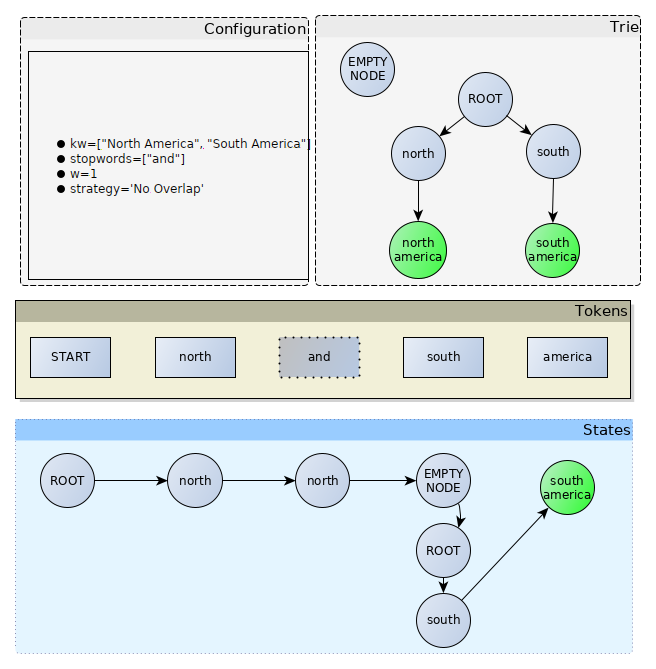
The NoOverlap matching strategy was the first matching strategy implemented by IAMsystem and was described in research papers. It only uses a window of 1 (window parameter has no effect) and doesn’t detect nested annotations. First, the algorithm builds a trie datastructure to store all the keywords. Then, for each token in the document, it calls fuzzy matching algorithms (not shown on the image) and tries to find a match at the current state. The first state is the ROOT node of the trie. If a token is a stopword (and in the example), the algorithm goes to the next token and the states remain the same. If the next token is a dead end (south in the example), the algorithm returns to the ROOT node and starts again. When the algorithm reaches a node containing a keyword (the green node in the example), it generates an annotation. In general, a single path is found, so the algorithm doesn’t generate any overlap.
Window Matching
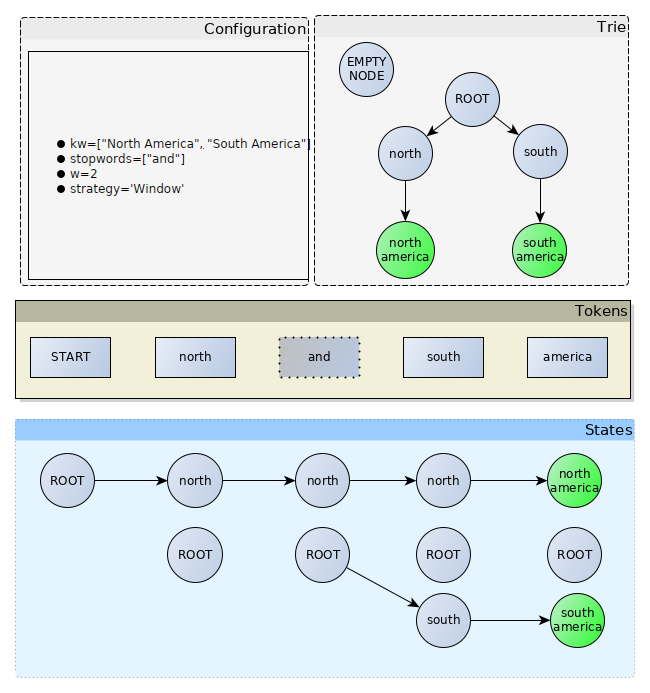
This is the default strategy. It is used in all the examples of this documentation. Compared to the NoOverlap strategy, the ROOT node is repeated at each step which makes it possible to detect nested annotations. Also the window size determines the lifetime of a node. In this example, the state/node north is always alive at the south token because the window size is 2, which means that that north is two tokens away from America, excluding the stop words.
Window Matching speed and LargeWindowMatching
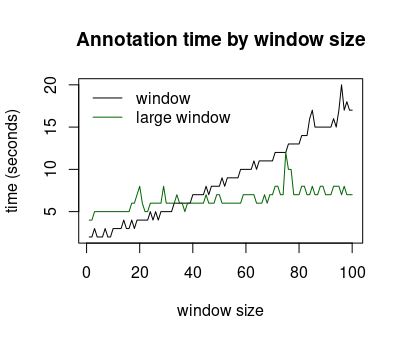
When the window size is small, the number of operations depends little on the number of keywords. As the window increases, the number of operations grows and can become proportional to n*m with n the number of tokens in the document and m the number of keywords. The LargeWindowMatching strategy trades space for time complexity, it produces exactly the same annotations as the WindowMatching strategy with a number of operations proportional to n*log(m). LargeWindowMatching is slower than the WindowMatching when w is small but much faster when w is large, for example when w=1000. The image above shows that the LargeWindowMatching strategy becomes faster as the window exceeds a certain threshold. The value of the threshold depends on the terminology, so performance tests should be performed when a large window is used.